

%20copy.webp?width=224&height=259&name=logomark%20(1)%20copy.webp)
What are Managed IT Services?
Managed IT Services are a way for businesses to outsource the ongoing management, monitoring, security, and support of their IT systems to a specialized provider, often called a Managed Service Provider (MSP). Instead of calling IT only when something breaks, Managed IT focuses on preventing problems before they disrupt the business.
You pay a predictable monthly fee. In return, you get:
- 24/7 monitoring and issue detection
- Help desk support for your team
- Security patching and updates
- Backup management and disaster recovery planning
- Strategic IT planning tied to your business goals
- Support for technological purchases and rollouts
The goal isn't just fixing problems. It's preventing them and making sure your technology actually helps your business move forward instead of holding it back.
Proactive vs Reactive IT Management
There are two primary ways for a business to manage IT including the reactive (known as the break/fix model) and the proactive approach (Managed IT model). Key elements of each include:
- Break/fix: The business pays when something stops working. Usually, the fee is based on hourly rates, per-incident charges, and typically there is no ongoing relationship. Once the problem has been resolved the vendor does not provide additional guidance or monitoring for future concerns.
- Managed services: The business pays a fixed amount for proactive monitoring, support, services and IT strategy. The provider becomes a partner who keeps systems running and helps management address issues, risks, and participates in proactive planning. This approach is effective for those who want to scale with growth.
Key Benefits of the Managed IT Approach
There are several benefits to using the Managed It approach, including:
- Proactive IT Problem Prevention and Monitoring - With monitoring in place, your MSP spots issues early. A failing drive gets flagged and replaced before it crashes. A security patch gets applied before it becomes a vulnerability. Users stay productive because problems don't reach them.
- Predictable IT Budget and Cost Control - Instead of bracing for surprise bills every quarter, you know exactly what you're spending. That makes budgeting easier, justifying IT investment simpler, and scaling your infrastructure less stressful.
- Strategic Technology Planning for Business Growth - Your MSP isn't just fixing tickets. They're helping you plan server refreshes, evaluate new software, prepare for audits, and think through how IT supports your next phase of growth. You stop reacting and start planning.
- Enhanced Cybersecurity Protection - Managed services include baseline protections most break/fix providers don't touch: firewalls, endpoint detection, email filtering, backup verification, and someone watching for threats in real time. It's built in, not bolted on after a scare.
- Increased Employee Productivity and Reduced Downtime - Fewer disruptions mean less time troubleshooting and more time doing the work that actually drives revenue. Faster ticket resolution means problems don't snowball into multi-day headaches.
The Managed Service Provider (MSP) model explained
The Managed Service Provider (MSP) model is a business approach in which an organization outsources the ongoing management, monitoring, and support of its IT systems—or other operational functions—to a specialized third-party provider for a predictable recurring fee. Rather than reacting to problems only when they arise, the MSP model emphasizes proactive maintenance, continuous monitoring, and strategic guidance to keep technology and operations running reliably and securely.
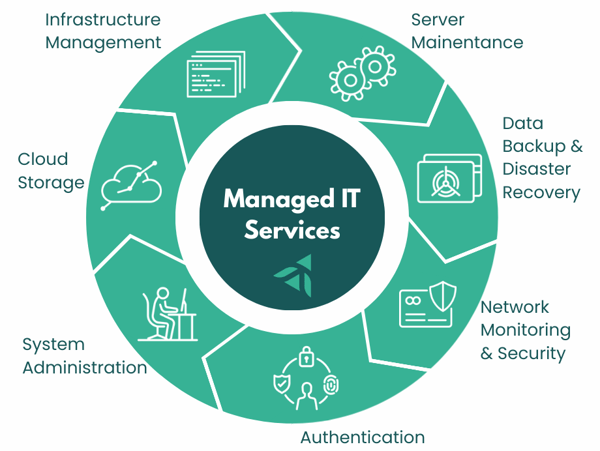
In a traditional break-fix IT model, a company calls a technician only after something fails, resulting in unpredictable costs and downtime. The MSP model replaces this with a subscription-style relationship: the provider remotely monitors systems, applies updates and security patches, manages backups, supports users, and often advises on technology planning. This shift aligns the provider’s incentives with the client’s outcomes—both benefit when systems stay stable, secure, and efficient.
MSPs typically deliver services in tiers. Foundational services often include network and device monitoring, help desk support, patch management, antivirus and endpoint protection, backup and disaster recovery oversight, and vendor coordination. More advanced MSP offerings may expand into cybersecurity operations (such as threat detection and response), cloud infrastructure management, compliance support, and strategic IT leadership through a virtual CIO (vCIO) or virtual CTO model. The goal is to give organizations enterprise-grade IT capabilities without needing a full in-house team.
The financial structure of the MSP model is also central to its appeal. Clients usually pay a per-user or per-device monthly fee, which converts unpredictable IT spending into a known operating expense. For providers, recurring revenue creates stability and enables investment in automation tools, monitoring platforms, and security infrastructure that benefit all clients. This economies-of-scale dynamic is why MSPs can often deliver higher service levels at lower total cost than internal IT for small and midsize organizations.
From a governance perspective, MSP relationships are typically formalized through service-level agreements (SLAs) that define response times, uptime expectations, security responsibilities, and escalation procedures. This contractual clarity distinguishes MSPs from ad-hoc IT consultants and supports accountability and performance measurement.
What’s Included in Managed IT Services?
Proactive Monitoring & Maintenance
Proactive monitoring and maintenance form the foundation of managed IT services, shifting technology support from reactive troubleshooting to continuous prevention and optimization. Instead of waiting for systems to fail, the managed service provider (MSP) uses remote monitoring and management (RMM) platforms to track the health, performance, and security status of servers, networks, endpoints, and cloud resources around the clock. This constant visibility allows issues—such as failing hardware, unusual activity, storage shortages, or performance degradation—to be detected and resolved before they disrupt business operations.
24/7 system monitoring means that critical infrastructure is supervised at all times, including nights and weekends, with automated alerts and escalation workflows that trigger immediate investigation when thresholds are exceeded or anomalies appear. Patch management and updates ensure that operating systems, applications, firmware, and security tools are consistently kept current, closing known vulnerabilities and improving stability without requiring internal staff intervention. Performance optimization involves ongoing tuning of systems and networks—such as resource allocation, capacity planning, cleanup of obsolete processes, and configuration adjustments—to maintain speed, reliability, and user productivity as workloads evolve.
Together, these proactive activities reduce downtime, extend equipment life, improve cybersecurity posture, and provide predictable, stable IT performance, one of the core value propositions of the MSP model you’re outlining for managed IT service content.
IT Help Desk & End User Support
This type of support provides the day-to-day assistance employees need to stay productive, forming the most visible layer of managed IT services. In the MSP model, users contact network operations center (NOC) assistance with technical issues, access requests, device setup, software problems, connectivity issues, or security concerns. The provider then delivers resolution through remote tools or dispatches on-site technicians when hands-on work is required.
Remote support ensures that most incidents—such as password resets, software troubleshooting, printer issues, or VPN connectivity—can be resolved quickly through secure remote access, while hardware failures, network installations, or office moves receive in-person service. Ticketing and SLA management structure this support through a formal system that logs requests, prioritizes them by severity and business impact, tracks response and resolution times.
Support for hybrid and remote teams has become a core MSP function as workforces operate across offices, homes, and mobile environments. Managed IT providers maintain secure remote access tools, endpoint management, collaboration platform support, and identity controls so users can work from anywhere with consistent performance and security. The result is faster issue resolution, reduced employee downtime, and a standardized support experience across distributed organizations.
Cybersecurity & Risk Management
Cybersecurity and risk management services within a managed IT program are designed to protect systems, data, and users from evolving threats while aligning technology controls with regulatory and business risk requirements. Rather than relying on isolated security tools, the MSP integrates layered defenses, continuous monitoring, and governance practices into a unified protection framework appropriate for small and mid-sized organizations that lack dedicated security teams.
Endpoint protection and EDR (endpoint detection and response) secure laptops, servers, and mobile devices through advanced antivirus, behavioral threat detection, device isolation, and continuous telemetry monitoring that can identify and contain ransomware or malicious activity in real time. Email security and phishing prevention address the most common attack vector by filtering malicious messages, blocking dangerous links and attachments, and applying impersonation and domain-spoofing defenses, often paired with user awareness training and simulated phishing campaigns to reduce human risk.
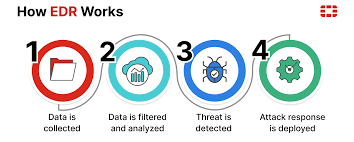
Firewall and network security services manage perimeter and internal traffic controls, including firewall configuration, intrusion detection and prevention, secure VPN access, network segmentation, and ongoing log monitoring to identify suspicious connections or policy violations. Vulnerability scanning and remediation add a proactive risk layer by routinely scanning systems and applications for known weaknesses, prioritizing them by severity and exposure, and coordinating patching or configuration fixes before attackers can exploit them.
Compliance support extends cybersecurity into governance and regulatory alignment. MSPs help organizations implement and document required safeguards, policies, and controls for frameworks such as healthcare privacy rules, service-organization controls reporting, and defense-contractor cybersecurity standards. This typically includes risk assessments, security policies, access controls, audit logging, incident response planning, and evidence collection to support audits or certifications.
Backup, Disaster Recovery & Business Continuity
These services ensure that an organization can restore data and resume operations quickly after cyberattacks, system failures, or natural disruptions. Within the managed IT model, the MSP designs, monitors, and tests resilience processes so that recovery is predictable.
Data backup strategies define how critical information is protected across endpoints, servers, and cloud platforms using layered approaches such as on-site backups for rapid restores, encrypted off-site or cloud replication for disaster scenarios, and versioned or immutable storage that prevents ransomware from altering recovery points. MSPs also manage backup schedules, retention policies, monitoring, and periodic restore validation to confirm data integrity and recovery readiness.
Ransomware recovery planning focuses on ensuring that systems and data can be restored without paying attackers. This includes maintaining isolated backup copies, defining system rebuilding procedures, prioritizing application recovery order, documenting incident response steps, and coordinating cybersecurity containment with restoration workflows. The goal is to reduce downtime and financial impact.
Business continuity testing extends beyond data restoration to full operational resilience. MSPs help organizations document continuity plans—covering alternate work locations, communication protocols, vendor dependencies, and recovery time objectives—and then conduct tabletop exercises or live failover tests to validate that systems and teams can function during outages. For many, this structured resilience capability is essential to maintaining operations, meeting compliance expectations, and protecting revenue when disruptions occur.
IT Strategy & Technology Planning
IT strategy and technology planning elevate managed IT from operational support to business alignment, ensuring that technology investments, risks, and capabilities directly support organizational goals. In the MSP model, this advisory layer is often delivered through structured planning sessions, executive reporting, and long-term lifecycle management rather than ad-hoc technology decisions.
Virtual CIO
Virtual CIO (vCIO) services provide executive-level technology leadership without the cost of a full-time internal CIO. At a strategic level, the vCIO evaluates an organization’s current technology environment, cybersecurity posture, compliance obligations, and operational needs. From this assessment, they develop multi-year IT roadmaps that prioritize infrastructure upgrades, cloud adoption, cybersecurity investments, and lifecycle replacements based on business impact and risk. This transforms IT from reactive spending into planned investment tied to measurable outcomes.
The vCIO also builds and manages IT budgets, forecasts hardware and software lifecycle costs, and evaluates total cost of ownership for major technology decisions. They help leadership understand trade-offs—such as on-premises vs cloud, platform consolidation, or security investments—so technology spending remains predictable and aligned with organizational priorities.
The vCIO also guides vendors and solution strategy. They evaluate and select software platforms, cloud providers, and technology partners; oversee contracts and performance; and ensure tools integrate securely and efficiently. This reduces the risk of redundant systems, shadow IT, or underutilized subscriptions.
Governance and risk management are central to the role as well. The vCIO helps establish IT policies, cybersecurity standards, disaster recovery expectations, and compliance alignment with relevant regulations or frameworks. They often facilitate executive reporting and quarterly business reviews that track technology performance, risks, and roadmap progress—giving leadership visibility into IT as a managed business function rather than a technical black box.
HRIS Onboarding & Offboarding
This service includes the automated, secure creation and removal of employee access, devices, and system permissions based on HR lifecycle events recorded in the Human Resources Information System (HRIS). The HRIS becomes the authoritative trigger for identity and access management, ensuring that every hire, role change, or departure is consistently reflected across email, cloud apps, networks, and security controls.
For organizations relying on cloud platforms such as Microsoft 365, Google Workspace, line-of-business applications, and VPN access, the connection between HRIS and IT provisioning is critical. Managed IT providers typically integrate the HRIS with identity platforms (e.g., Azure AD / Entra ID, Okta, or similar directory services) so that employee status changes automatically drive account creation, role assignment, and deactivation. This eliminates manual IT tickets, reduces onboarding time, and closes common security gaps that occur when accounts remain active after terminated.
Onboarding begins the moment HR marks a new hire as accepted in the HRIS. The system generates workflows that provision email, collaboration tools, security policies, and device configurations aligned with the employee’s role. New users receive the correct licenses, file permissions, and multifactor authentication requirements on day one, while managers and IT receive coordinated task lists for equipment deployment and orientation readiness. This approach ensures that productivity and security are established simultaneously rather than sequentially.
Offboarding is equally important in a cybersecurity-focused environment. When HR records a separation date in the HRIS, automated deprovisioning workflows disable accounts, revoke tokens and VPN access, archive mailboxes, transfer ownership of files, and flag devices for return or remote wipe. Because the HRIS acts as the single source of truth for employment status, Managed IT teams avoid the risk of orphaned accounts, lingering SaaS licenses, or unauthorized access after departure—issues that are common root causes of data breaches and compliance failures.
Security Awareness Training
This is the structured, ongoing education of employees to recognize and respond to cyber threats such as phishing, social engineering, malware, and data-handling risks. While Managed IT providers deploy technical safeguards like firewalls, endpoint protection, and email filtering, human behavior remains one of the most common entry points for cyber incidents. Security awareness training addresses this risk by turning employees into an active layer of defense rather than a vulnerability.
In practice, security awareness is delivered as a managed program rather than a one-time training event. Employees receive short, role-based learning modules throughout the year covering topics such as phishing identification, password hygiene, multifactor authentication, safe file sharing, and data privacy practices. Training is typically reinforced with simulated phishing campaigns that test real-world behavior and identify users or departments needing additional coaching. Results are tracked and reported to leadership, providing measurable insight into organizational risk exposure and improvement over time.
vCIO vs VCISO comparison
Businesses often engage fractional technology leadership in the form of a virtual Chief Information Officer (vCIO) or a virtual Chief Information Security Officer (vCISO). Both roles provide executive-level guidance without the cost of a full-time hire, but they focus on different dimensions of IT maturity: the vCIO aligns technology with business strategy and operations, while the vCISO governs cybersecurity risk, compliance, and protection.
A vCIO operates as the strategic IT planner for the business. This role evaluates current systems, defines technology roadmaps, manages IT budgets, and ensures that infrastructure, cloud platforms, and applications support growth and efficiency. The vCIO typically leads initiatives such as digital transformation, system selection, lifecycle planning, vendor management, and IT policy development. The vCIO ensures that the organization’s technology environment evolves intentionally rather than reactively, balancing performance, cost, and scalability.
A vCISO, by contrast, is the executive responsible for information security governance and risk management. This role establishes the cybersecurity strategy, defines security policies and controls, oversees risk assessments, and guides incident response readiness. The vCISO also maps security practices to regulatory frameworks such as SOC 2, HIPAA, ISO 27001, or CMMC, ensuring that technical safeguards, user controls, and documentation meet assurance expectations. The vCISO provides the security architecture and governance layer that sits above the operational security tools deployed by the MSP.
Help Desk Hours vs. 24/7 Monitoring
Help Desk Hours and 24/7 Monitoring represent two distinct but complementary support layers: one is human support availability for user issues, and the other is continuous automated oversight of systems and security. Understanding the difference helps organizations set realistic expectations about responsiveness, coverage, and risk protection.
Help desk hours define when employees can directly contact IT support for assistance with issues such as login problems, software errors, device malfunctions, or access requests. Most offer help desk coverage during defined business hours (for example, 7:00 a.m. to 6:00 p.m.), with service-level targets for response and resolution. Some organizations extend this to evenings or weekends depending on workforce schedules.
24/7 monitoring, by contrast, operates continuously in the background regardless of help desk availability. Managed IT providers deploy monitoring and security tools across servers, networks, cloud platforms, and endpoints that watch for outages, performance degradation, hardware failures, suspicious activity, and cybersecurity threats at all hours. Alerts trigger automated responses or on-call technician intervention even when no user has reported an issue. Monitoring is therefore system-driven rather than user-driven, focused on prevention and early detection rather than reactive troubleshooting.
This distinction is particularly important for cybersecurity and uptime risk. Many critical incidents—ransomware execution, server crashes, storage failures, after-hours intrusions—occur outside normal business hours. Organizations with only business-hour help desk support but no 24/7 monitoring remain exposed during nights and weekends. Conversely, organizations with 24/7 monitoring but limited help desk hours still maintain protection and system stability, even if user assistance is scheduled for the next business period unless the issue is severe.
In most cases, companies pair the two through escalation tiers. Monitoring tools run continuously and generate alerts. If an alert indicates a critical outage or security event, the on-call engineers respond immediately regardless of help desk hours. Routine user requests, however, are handled during standard help desk windows. This layered model balances cost and coverage: continuous protection without requiring full-time staffed user support overnight.
Managed SIEM, SOC, and IDS
Managed SIEM, SOC, and IDS represent the continuous detection and response layer that watches for cyber threats across networks, devices, and cloud systems. While endpoint protection, firewalls, and email security block many attacks, these tools focus on identifying suspicious behavior that bypasses defenses or originates internally. Managed IT providers deliver this capability as an integrated service that combines technology platforms with human security analysts and response procedures.
A Managed SIEM (Security Information and Event Management) system aggregates logs and security telemetry from across the organization’s environment including servers, endpoints, firewalls, cloud apps, identity platforms, and business systems. The SIEM normalizes and correlates this data to identify patterns such as unusual logins, privilege escalation, lateral movement, or data exfiltration indicators. In a managed model, the MSP configures log sources, tuning rules, retention policies, and alert thresholds, then continuously reviews events for threats. The SIEM provides the central visibility layer and audit trail required for incident investigation and compliance reporting.
The SOC (Security Operations Center) is the human and process layer that operates on top of the SIEM and related security tools. The SOC consists of security analysts who monitor alerts, investigate anomalies, validate threats, and coordinate response actions. When the SIEM or other controls generate an alert, SOC analysts determine whether it represents benign activity, policy violation, or active compromise. They then initiate containment steps such as disabling accounts, isolating devices, blocking IPs, or escalating to incident response procedures. The SOC therefore converts raw security telemetry into actionable defense and rapid response.
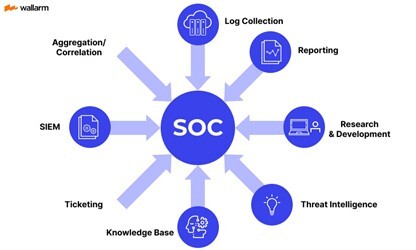
An IDS (Intrusion Detection System) focuses specifically on identifying malicious or suspicious network activity. Network-based IDS monitors traffic patterns and signatures to detect exploits, command-and-control communications, scanning, or abnormal protocols, while host-based IDS monitors activity on individual systems. In Managed IT environments, IDS feeds alerts into the SIEM, where they are correlated with identity, endpoint, and cloud signals to confirm or dismiss threats. IDS acts as a specialized sensor layer within the broader detection architecture.
Together, these components form a layered detection model. IDS and other sensors generate security signals. The SIEM aggregates and correlates those signals with contextual data such as user identity and asset criticality. The SOC interprets and responds to the resulting alerts. Managed IT providers deliver this as a continuous service with 24/7 monitoring, threat intelligence integration, alert triage, incident escalation, and reporting. Organizations gain enterprise-grade detection and response capability without building an internal security operations function.
IT Roadmaps
IT roadmaps and budgeting convert strategy into a multi-year technology plan that sequences upgrades, cloud migrations, security investments, and infrastructure refresh cycles based on business impact and risk. MSPs forecast lifecycle replacement timelines, subscription and licensing costs, and project investments so organizations can move from reactive IT spending to predictable, planned budgets tied to measurable outcomes.
Vendor Selection
Vendor and software selection ensures that organizations choose and manage the right technology partners and platforms. MSPs evaluate solutions against requirements, security standards, integration needs, and total cost of ownership; coordinate procurement and implementation; and oversee vendor performance. This reduces the risk of incompatible tools, shadow IT, or underutilized software while maintaining a cohesive, secure technology stack.
Managed IT Services vs Other IT Models
There are several benefits offered to companies that are considering transitioning from the break-fix to the Managed IT services model, including:
- Proactive IT Problem Prevention and Monitoring - With monitoring in place, your MSP spots issues early. A failing drive gets flagged and replaced before it crashes. A security patch gets applied before it becomes a vulnerability. Users stay productive because problems don't reach them.
- Predictable IT Budget and Cost Control - Instead of bracing for surprise bills every quarter, you know exactly what you're spending. That makes budgeting easier, justifying IT investment simpler, and scaling your infrastructure less stressful.
- Strategic Technology Planning for Business Growth - Your MSP isn't just fixing tickets. They're helping you plan server refreshes, evaluate new software, prepare for audits, and think through how IT supports your next phase of growth. You stop reacting and start planning.
- Enhanced Cybersecurity Protection - Managed services include baseline protections most break/fix providers don't touch firewalls, endpoint detection, email filtering, backup verification, and someone watching for threats in real time. It's built in, not bolted on after a scare.
- Increased Employee Productivity and Reduced Downtime - Fewer disruptions mean less time troubleshooting and more time doing the work that actually drives revenue. Faster ticket resolution means problems don't snowball into multi-day headaches.
Perhaps one of the most compelling benefits is the cost predictability. Managed IT operates on a recurring subscription or per-user fee that bundles monitoring, maintenance, support, and security into a known monthly operating expense. Break-fix IT, by contrast, charges only when something fails—creating irregular, often large invoices tied to emergencies, hardware replacements, or crisis response. Over time, organizations in break-fix environments tend to spend more overall because deferred maintenance and outdated systems lead to larger failures and reactive projects.
Managed IT vs In House IT
Cost comparison between managed IT and in-house IT hinges on how organizations fund expertise and infrastructure. Building an internal IT function requires salaries, benefits, training, management overhead, tools, security platforms, and coverage for absences. All of these costs can grow quickly. Managed IT converts most of this into a predictable subscription that spreads specialized staff, enterprise-grade tools, and monitoring infrastructure across many clients. For small and mid-market organizations, these shared services typically deliver broader capability at lower total cost than maintaining a fully staffed internal team.
Skill depth and coverage differ significantly between the two approaches. An in-house IT department, especially in smaller organizations, often consists of one or a few generalists responsible for everything from help desks to cybersecurity to cloud systems. Managed IT providers, by contrast, maintain teams of specialists across infrastructure, cybersecurity, cloud, networking, compliance, and user support. This provides organizations access to a wider range of expertise and best practices than a single internal hire or small team can realistically sustain.
Scalability and continuity also favor the managed model. As organizations grow, adopt new systems, or face regulatory changes, an MSP can scale services, tools, and expertise without requiring new hires or restructuring. Continuity is similarly stronger: MSP teams provide 24/7 coverage, documented procedures, and redundancy across personnel, reducing risk from staff turnover, vacations, or single-point-of-failure knowledge. In-house IT environments often depend heavily on specific individuals, creating operational risk if key staff leave or are unavailable.
Managed IT vs. Co-Managed IT
When co-managed IT makes sense is typically when an organization already has internal IT staff but needs broader expertise, additional capacity, or 24/7 coverage that the internal team alone cannot provide. Mid-sized companies, multi-location organizations, and regulated industries often adopt co-managed models to strengthen cybersecurity, support growth, or handle complex infrastructure and compliance demands. It is especially effective when internal IT is strong in day-to-day user support and institutional knowledge but lacks specialized skills in areas such as advanced security monitoring, cloud architecture, compliance frameworks, or strategic planning. In these cases, the MSP adds to rather than replaces internal IT—providing tools, expertise, and scale that would be costly to build internally.
How internal IT teams and MSPs work together in a co-managed model is defined by clear role alignment and shared systems. The MSP typically provides centralized monitoring platforms, security tooling, patch automation, backup management, and escalation support, while the internal team retains direct user relationships, on-site presence, and business-specific system knowledge. Ticketing systems, documentation repositories, and communication protocols are shared so both parties operate within the same workflow and service levels. The MSP may handle after-hours coverage, complex incidents, cybersecurity operations, and strategic planning, while internal IT focuses on projects, departmental support, and organizational initiatives. Governance meetings—often quarterly—align roadmaps, risks, and performance metrics so the combined team functions as a unified IT department rather than separate providers.
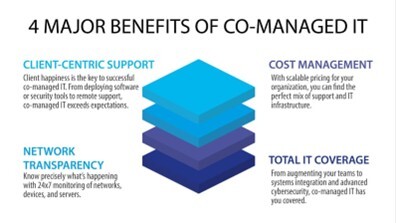
For organizations with existing IT staff, co-managed IT preserves internal expertise and culture while adding enterprise-grade tooling, security maturity, and staffing resilience. It effectively transforms a small internal team into a scaled, specialized IT function without the disruption or cost of replacing personnel.
Cybersecurity and Compliance Considerations
Why cybersecurity is central to Managed IT stems from the reality that most operational disruptions and financial losses originate from cyber incidents rather than system failure alone. Because MSPs continuously monitor systems, manage patches, control access, and oversee backups, they already operate at the control points where cyber risk is created or mitigated. Embedding cybersecurity into managed IT ensures that protection is continuous, standardized, and measurable rather than occasional or reactive. This integrated approach reduces ransomware risk, protects sensitive data, and preserves uptime—core outcomes that business leaders increasingly expect from IT services.
Regulatory and compliance support extends cybersecurity into documented governance aligned with industry and legal requirements. Managed IT providers help organizations implement and maintain safeguards such as access controls, audit logging, encryption, vulnerability management, and security policies mapped to applicable frameworks and regulations. This often includes readiness for healthcare privacy obligations, service-organization control reporting, defense-contractor cybersecurity standards, and similar requirements. For many mid-market and regulated organizations, managed IT becomes the operational backbone that keeps security control continuously in place between audits rather than scrambling before them.
Incident response planning ensures that organizations can detect, contain, and recover from cyber events in a structured and timely manner. MSPs help define response roles, escalation paths, forensic preservation steps, communication protocols, and recovery workflows tied to backup and restoration capabilities. They also provide monitoring and alerting that enables early detection, often supported by security operations processes. Regular tabletop exercises or simulations validate that leadership and technical teams understand their responsibilities during an incident, reducing confusion and downtime when real events occur.
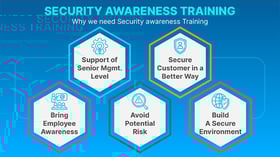
Employee security awareness training addresses the human element of cyber risk, which remains the most common entry point for attacks. Managed IT programs often include ongoing training modules, phishing simulations, and policy education so employees can recognize suspicious emails, unsafe links, credential harvesting attempts, and social engineering tactics. Reinforcing secure behavior—such as multi-factor authentication use, password hygiene, and data handling practices—complements technical defenses and measurably lowers breach likelihood. For organizations relying on distributed or hybrid workforces, this user-focused layer is essential to maintaining a consistent security posture across locations and devices.
How to Choose the Right Managed IT Provider
Key Questions to ask Potential Providers
- What exactly is included in the monthly fee? Get a specific list. 'Unlimited support' isn't an answer. You need to know what systems they monitor, what security measures are standard, and what triggers an extra charge.
- How do you handle issues proactively, not just reactively? Ask for examples. Do they monitor 24/7? Do they catch problems before users notice? You're looking for prevention, not just quick firefighting.
- What's your process for strategic planning? Good providers build roadmaps that align with your growth plans. If they can't articulate how they help you plan for the next 12-24 months, you're getting break/fix masked as managed services.
- How does pricing scale as we grow or change? Operations will change, so make sure the pricing model flexes. Rigid contracts become expensive problems.
Red Flags to Guard Against
Before selecting a Managed Service Provider it’s important to be aware of potential red flags which could spell trouble if the company decides to work with them. Some issues to consider include:
- Vague or Undefined Service Scope - If an MSP can’t clearly explain what’s included and what’s not, that’s a warning sign. Phrases like “full support,” “unlimited help desk,” or “comprehensive security” without specifics usually mean gaps. A reliable provider should spell out monitoring, patching, backups, cybersecurity tools, response times, and exclusions in plain language.
- No Proactive Monitoring or Preventive Strategy - An MSP that talks mostly about fixing issues—but not preventing them—is essentially offering dressed-up break-fix IT. If they don’t emphasize 24/7 monitoring, patch management, vulnerability remediation, and regular system reviews, you’re likely paying monthly for a reactive model.
- Weak Cybersecurity Posture - Cybersecurity should be central to Managed IT, not an add-on. Red flags include limited endpoint protection, no mention of phishing defenses, unclear backup and recovery processes, or an inability to explain how ransomware would be contained. If security is sold separately—or vaguely—it’s a risk.
- No Documented SLAs or Accountability - Service Level Agreements matter. If response times, escalation procedures, and resolution targets aren’t documented, you have no leverage when systems go down. A strong MSP defines expectations upfront and reports against them consistently.
- Poor Reporting and Limited Transparency - If you won’t receive regular reports on system health, security events, backups, and performance, you’ll be operating blind. Managed IT should give you visibility into what’s happening behind the scenes—not just silence when things are “working.”
- One-Size-Fits-All Solutions - Every business has different risk profiles, compliance needs, and growth plans. Providers that push identical packages for all clients often ignore industry-specific requirements like HIPAA, SOC 2, CMMC, or data retention rules. Lack of customization is a long-term liability.
- Overreliance on a Single Technician- If support depends on “their main guy,” continuity becomes a problem. Ask how coverage works during vacations, turnover, or emergencies. Mature MSPs use teams, documentation, and standardized processes—not individual heroics.
Security Expertise & Certifications
When selecting a Managed IT Services provider, security expertise and formal certifications are critical indicators of whether the provider can actually protect your systems—or just talk about it. A credible MSP should demonstrate both hands-on cybersecurity capability and recognized third-party validation of their practices.
Strong security expertise starts with how the provider designs and manages environments. This includes layered cybersecurity controls such as endpoint detection and response (EDR), secure email gateways, firewall and network segmentation, vulnerability scanning, backup isolation, and incident response planning. The provider should be able to clearly explain how threats like ransomware, phishing, and credential compromise are detected, contained, and remediated—not just which tools they resell.
Certifications matter because they show the MSP’s security program has been independently evaluated. Look for providers that hold or actively maintain SOC 2 compliance, which validates internal controls around security, availability, and confidentiality. For organizations that serve the federal supply chain or defense contractors, experience with CMMC is especially important. Healthcare-focused providers should understand HIPAA safeguards, while firms working with sensitive financial data should be familiar with ISO/IEC 27001 principles.
Individual technical certifications also help confirm depth of expertise. Common examples include Microsoft security certifications for cloud environments, firewall and network security certifications, and vendor-agnostic credentials such as CISSP or Security+. While certifications alone don’t guarantee quality, the absence of them—especially in regulated or high-risk environments—is a red flag.
Finally, security expertise should show up in process, not just paperwork. A trustworthy MSP will conduct regular risk assessments, provide security reporting, test backups, train users on security awareness, and document incident response procedures. They should also be transparent about how they secure their own systems, not just yours.